Decision steps are one of the most powerful features of Centrali Automation. They let you route workflows based on data conditions without writing any code.
In this guide, we'll explore how to use decision steps effectively.
What Are Decision Steps?
Decision steps evaluate conditions against your workflow data and route to different next steps based on the results. Think of them as if/else statements for your workflows.
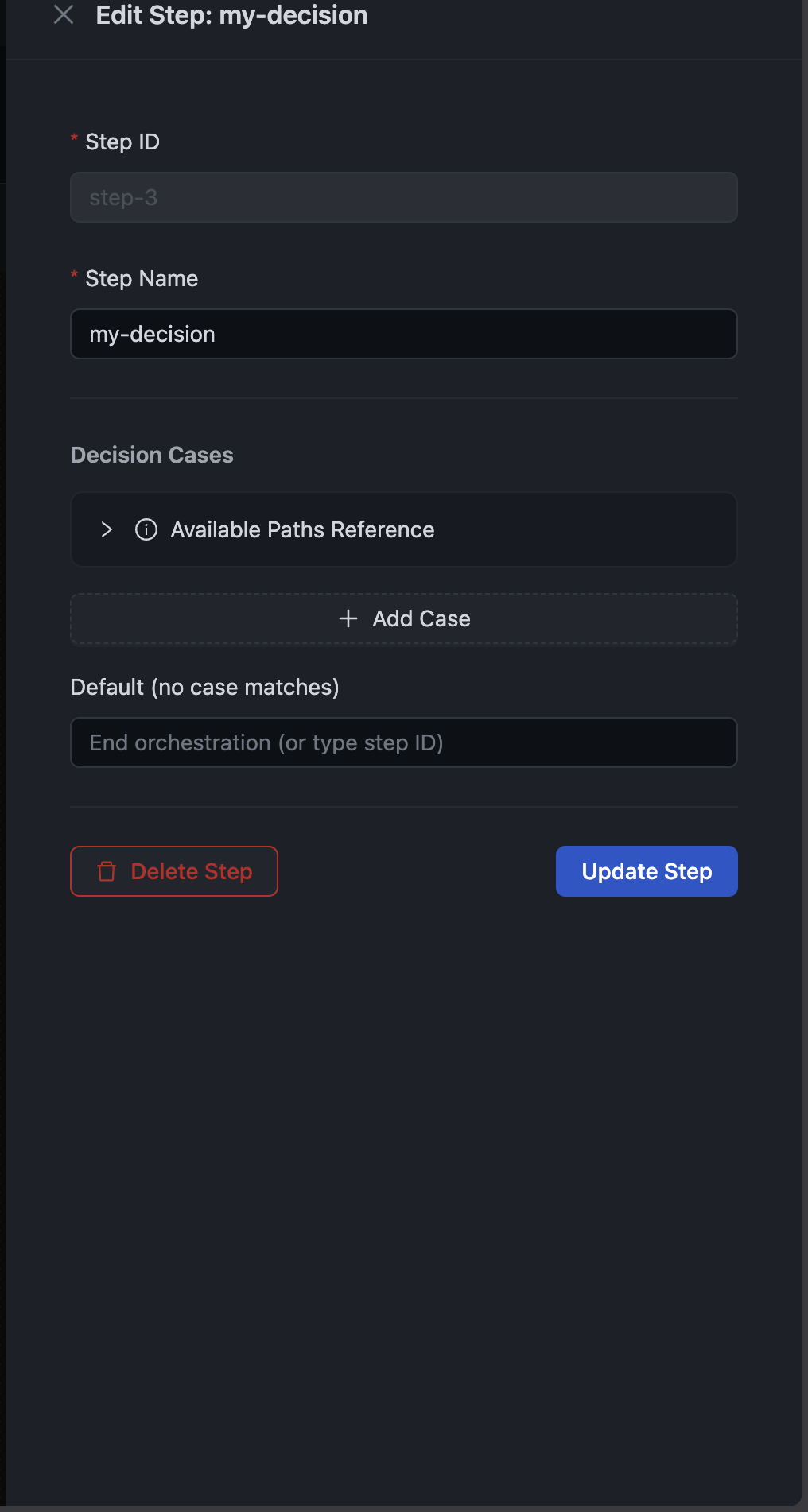
A decision step has:
- Cases — Each case has one or more conditions and a "then go to" step
- Default — What happens when no case matches
Comparison Operators
Decision steps support 10 comparison operators:
| Operator | Description | Example |
|---|---|---|
eq | Equals | status equals "approved" |
neq | Not equals | status not equals "pending" |
gt | Greater than | amount greater than 100 |
gte | Greater than or equal | quantity >= 1 |
lt | Less than | retryCount < 3 |
lte | Less than or equal | priority <= 5 |
exists | Field exists | email exists |
notExists | Field doesn't exist | deletedAt not exists |
in | Value in array | status in ["approved", "completed"] |
notIn | Value not in array | region not in ["blocked", "restricted"] |
Referencing Data
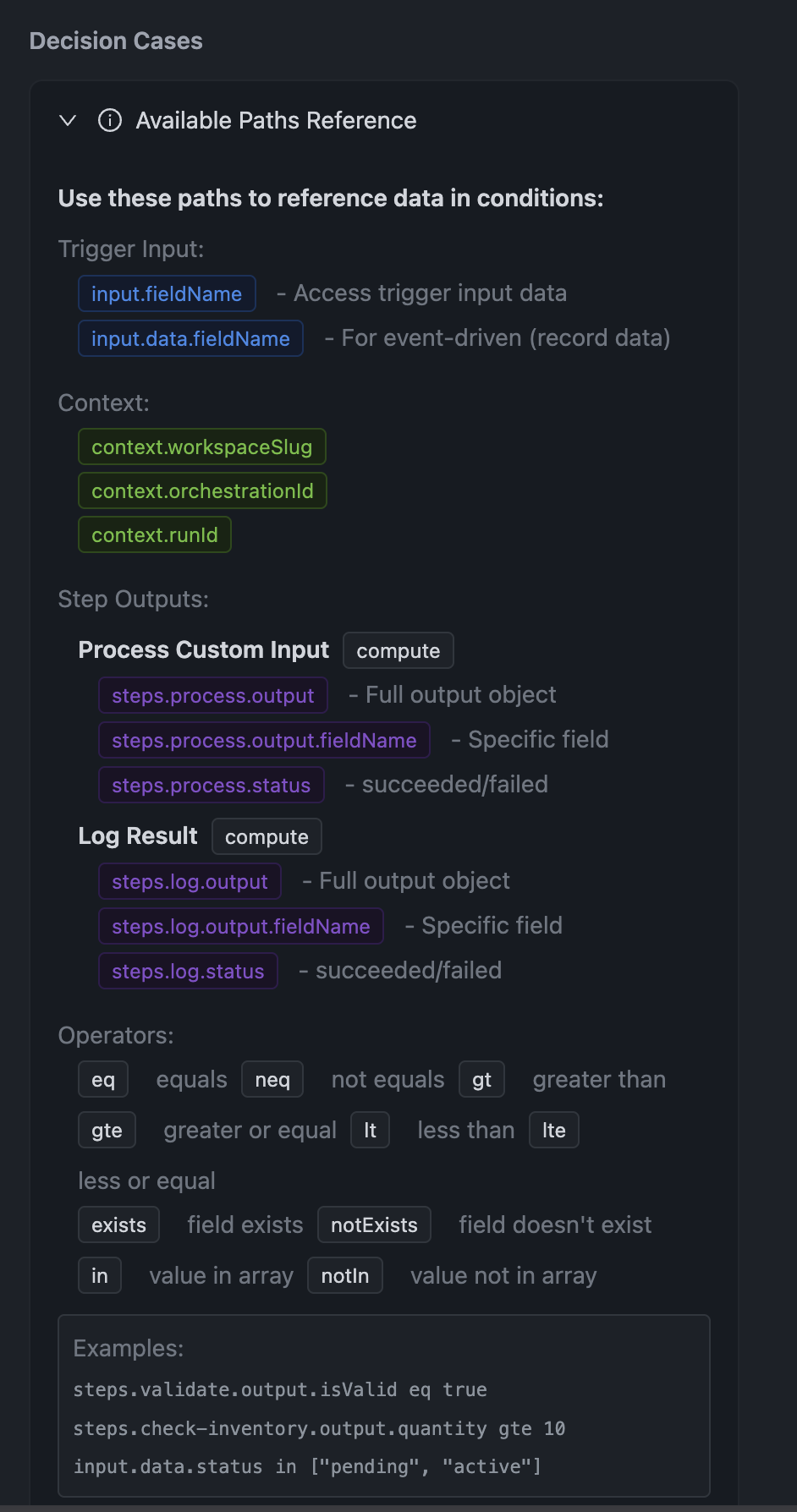
The Available Paths Reference panel shows all the data you can reference:
Trigger Input
Access data from the trigger:
input.fieldName— Top-level trigger input fieldsinput.data.fieldName— For event triggers, the record data
Examples:
input.amount → 100input.data.status → "pending"input.data.customer.email → "[email protected]"
Context Variables
Access workflow context:
context.workspaceSlug— Current workspacecontext.orchestrationId— This orchestration's IDcontext.runId— Current run ID
Step Outputs
Access outputs from previous steps:
steps.stepId.output— Full output objectsteps.stepId.output.fieldName— Specific fieldsteps.stepId.status— succeeded or failed
Examples:
steps.validate.output.isValid → truesteps.process.output.transactionId → "txn_123"steps.transform.status → "succeeded"
Building Conditions
Single Condition
The simplest case: one condition, one outcome.
Example: Route premium customers to priority processing
Case 1:Condition: input.data.tier equals "premium"Then go to: priority-processingDefault: standard-processing
Multiple Conditions (AND Logic)
When a case has multiple conditions, all must match (AND logic).
Example: High-value orders from trusted customers
Case 1:Condition 1: input.data.amount gte 1000Condition 2: input.data.customer.verified equals trueThen go to: expedited-processingDefault: standard-processing
Both conditions must be true for the case to match.
Multiple Cases (OR Logic)
Use multiple cases when you need OR logic.
Example: Route by status
Case 1:Condition: input.data.status equals "approved"Then go to: process-approvedCase 2:Condition: input.data.status equals "pending_review"Then go to: request-reviewCase 3:Condition: input.data.status equals "rejected"Then go to: handle-rejectionDefault: handle-unknown-status
Using Step Outputs
Route based on what previous steps returned.
Example: Check validation result
Case 1:Condition: steps.validate-order.output.isValid equals trueThen go to: process-paymentCase 2:Condition: steps.validate-order.output.errors existsThen go to: handle-validation-errorsDefault: handle-unexpected
Real-World Examples
Example 1: Order Amount Routing
Route orders to different processing based on value:
Case 1: "Large Order"Condition: input.data.totalAmount gte 10000Then go to: large-order-reviewCase 2: "Medium Order"Condition 1: input.data.totalAmount gte 1000Condition 2: input.data.totalAmount lt 10000Then go to: standard-processingDefault: small-order-processing
Example 2: Geographic Routing
Route based on customer region:
Case 1: "EU Customers"Condition: input.data.country in ["DE", "FR", "IT", "ES", "NL"]Then go to: eu-compliance-checkCase 2: "US Customers"Condition: input.data.country equals "US"Then go to: us-processingDefault: international-processing
Example 3: Error Recovery
Check if a step failed and route to recovery:
Case 1: "Payment Succeeded"Condition: steps.process-payment.status equals "succeeded"Then go to: send-confirmationCase 2: "Payment Failed - Retryable"Condition 1: steps.process-payment.status equals "failed"Condition 2: steps.process-payment.output.retryable equals trueThen go to: retry-paymentDefault: manual-review
Example 4: Feature Flags
Route based on experiment groups:
Case 1: "New Flow Enabled"Condition 1: input.data.user.experimentGroup equals "new-checkout"Condition 2: steps.check-feature-flag.output.enabled equals trueThen go to: new-checkout-flowDefault: legacy-checkout-flow
Tips for Decision Steps
1. Order Cases by Specificity
Put more specific cases first. Cases are evaluated in order, and the first match wins.
✓ Good:Case 1: amount >= 10000 AND isPremium = true (most specific)Case 2: amount >= 10000 (less specific)Case 3: isPremium = true (even less specific)Default: standard (catch-all)✗ Bad:Case 1: isPremium = true (matches before amount check)Case 2: amount >= 10000 (never reached for premium users)
2. Always Define a Default
The default path catches unexpected scenarios. Even if you think all cases are covered, add a default that logs the unexpected state:
Default: log-unexpected-state
3. Use Meaningful Case Names
When viewing runs, you'll see which case matched. Use descriptive names:
✓ "High-Value Premium Customer"✓ "Retry After Transient Error"✗ "Case 1"✗ "Check"
4. Test Edge Cases
Use the on-demand trigger to test:
- What happens when a field is missing?
- What happens with boundary values (exactly 1000, not 999 or 1001)?
- What happens when multiple cases could match?
5. Check the Evaluation Trace
When debugging, the run details show exactly which conditions matched or failed:
Evaluation Trace:Case "High Value":- input.data.amount >= 10000: true (actual: 15000)- input.data.tier = "premium": false (actual: "standard")→ Case did not match (not all conditions met)Case "Standard Order":- input.data.amount >= 100: true (actual: 15000)→ Case matched, routing to standard-processing
Summary
Decision steps let you build sophisticated routing logic without code:
- 10 operators for comparing values
- Nested paths to access deep data
- Multiple conditions per case (AND logic)
- Multiple cases for branching (OR logic)
- Default fallback for unexpected scenarios
Combined with compute steps and delay steps, you can build complex workflows that handle real-world business logic.
Check out the Decision Steps documentation for the full API reference.