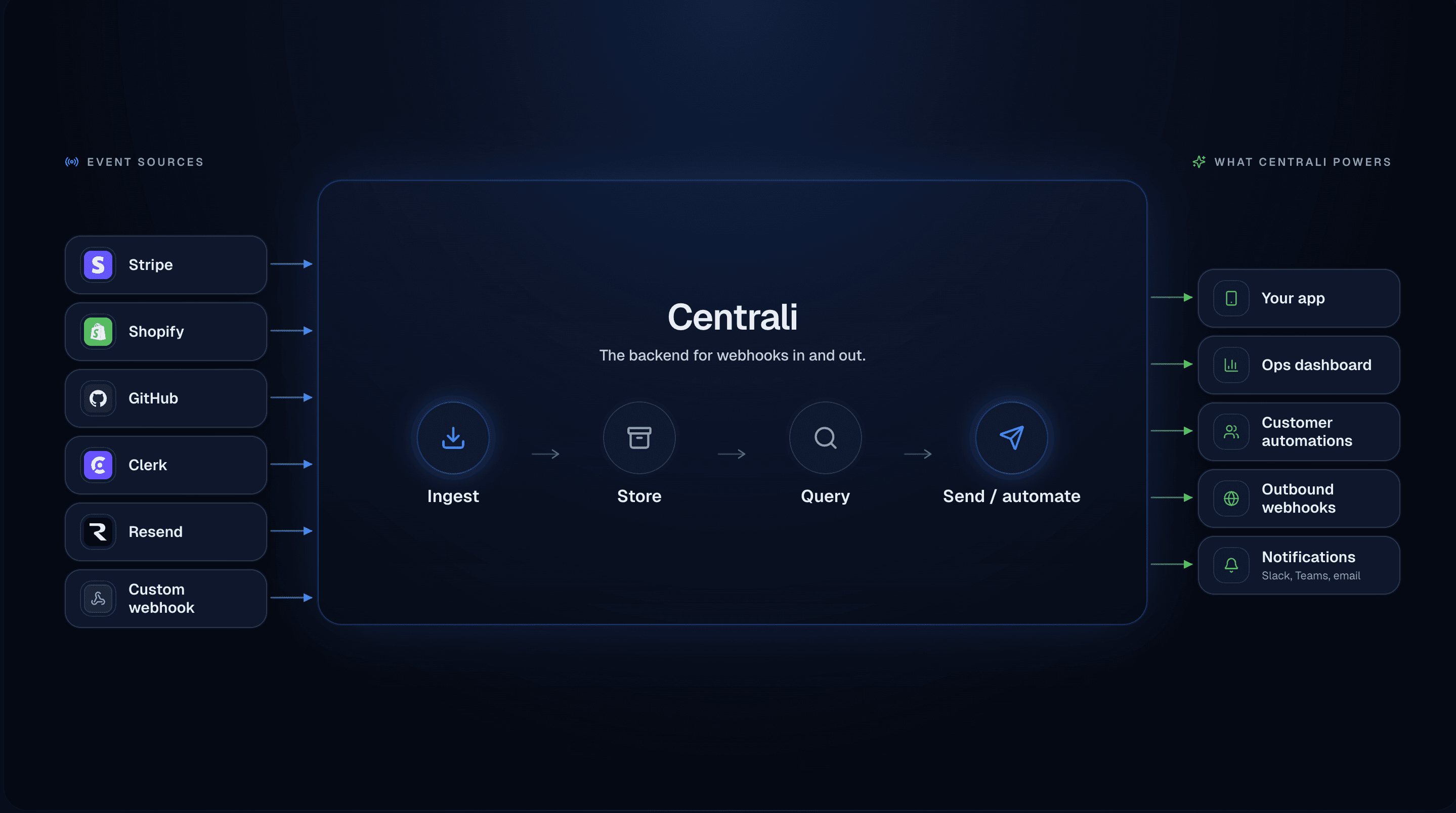
Everything you need in one backend.
Centrali brings data, compute, storage, search, and automation into a single platform—with one API and one mental model.
Use it as your "default backend" for SaaS apps, internal tools, and data-backed products without managing infrastructure.
Core capabilities
Centrali is built around a small set of powerful primitives that cover most backend needs without a pile of services.
AI-Assisted Development
AI helps you build — your code stays clean
Use AI in the console to scaffold schemas, generate function code, and search with natural language. Your production code uses the SDK and REST API — no AI dependency at runtime.
View in docs →Pages
Build web apps from your data
Turn your collections into published web pages — list views, detail pages, forms, and dashboards — with a visual editor and one-click publishing. No frontend code required.
View in docs →Data Management
Collections, records, and querying
Define schemas, validate records, and query your data with a structured query language—without managing a database cluster.
View in docs →Functions
Serverless business logic
Run JavaScript functions close to your data. React to events, expose HTTP handlers, and schedule recurring work.
View in docs →Storage & Search
Files and full-text search, built in
Upload files, store metadata, and search across your data with full-text indexing—no separate search cluster required.
View in docs →Automation
Multi-step workflows and event-driven automation
Chain your compute functions into multi-step workflows with conditional logic, scheduling, and automatic retries. Define via the console editor or the API.
View in docs →Access Control
Workspaces, roles, permissions
Protect your data with workspace isolation and fine-grained access rules that fit multi-tenant apps by default.
View in docs →Developer Experience
APIs, SDKs, examples
A clean REST API, TypeScript SDK, and real examples so you can ship production code quickly.
View in docs →How it all fits together
Each part of Centrali is designed to work with the others—collections power queries, queries trigger functions, functions write records and emit events for automation.
AI-Assisted Development
Use AI in the console to scaffold schemas, generate function code, and search with natural language. Your production code uses the SDK and REST API — no AI dependency at runtime.
AI Schema Generator
Describe your data in plain English and get a complete schema with fields, types, and validation rules. No more manual configuration.
Natural Language Search
Search records using conversational queries like 'orders from last week with status shipped'. The AI translates your intent into filters.
Natural Language Record Creation
Create records by describing them instead of filling out forms. The AI extracts fields and validates against your schema.
Compute AI Assistant
Generate function code from descriptions. Describe what you want, and the AI writes working JavaScript using Centrali APIs.
AI Data Validation
Real-time validation catches format issues, inconsistencies, and outliers. Run batch scans to fix historical data quality issues.
Anomaly Detection & Insights
Continuous analysis surfaces unusual values, missing references, and data drift. View data quality scores and recommendations per collection.
Auto-Schema Discovery
Schemaless and auto-evolving modes for dynamic data ingestion. Accept or reject new fields discovered from incoming data.
AI Page Assembly
Describe the page you need in plain language and get a working layout with real data sources, actions, and navigation. Iterative refinement and generation logging built in.
Pages
Turn your collections into published web pages — list views, detail pages, forms, and dashboards — with a visual editor and one-click publishing. No frontend code required.
List, Detail, Form & Dashboard Pages
Docs →Four page types cover the most common patterns — browse records, view details, submit data, and visualize metrics. Each comes with purpose-built blocks and layout options.
18+ Block Types
Data tables, metric cards, charts (bar, line, area, pie), stat groups, kanban boards, calendars, filter bars, field displays, forms, related lists, Markdown, HTML, images, videos, and modals.
Actions & Navigation
Wire buttons and row clicks to navigate between pages, invoke HTTP triggers, run compute functions, or open modals — with parameter passing, confirmation dialogs, and toast feedback.
Variable Binding
Bind URL parameters, auth context, record fields, and static values to block data sources. Enables master-detail patterns, filtered views, and personalized pages without code.
Theming & Branding
Customize primary color, accent color, background, font family, and logo per page. Live preview shows changes before publishing.
Version History
Every save creates a versioned snapshot. View, compare, and roll back to any previous version of a page.
Declarative Modals
Add confirmation dialogs, detail previews, and quick-edit forms that open on top of any page — configured entirely from the editor.
Data-Bound HTML
Write HTML templates with {{field}} placeholders that render live collection data. Build custom cards, banners, and layouts beyond standard block types.
Data Management
Define schemas, validate records, and query your data with a structured query language—without managing a database cluster.
Collections & records
Docs →Model your data with collections that enforce validation and relationships, then store records with type-safe access via the API.
Query language
Docs →A declarative query language for filtering, sorting, and paginating your data—backed by indexing under the hood.
Reusable queries
Define reusable queries for common access patterns and power your UI without duplicating logic.
Secret fields
Docs →Mark string properties as secrets to encrypt at rest with AES-256-GCM. Values are masked in API responses and revealed only with explicit permission.
Functions
Run JavaScript functions close to your data. React to events, expose HTTP handlers, and schedule recurring work.
Functions
Docs →Write JavaScript functions that run in a managed environment with access to Centrali APIs via the context object.
Triggers & schedules
Docs →Invoke functions on data changes, HTTP webhooks, or on a recurring schedule—ideal for workflows and automation.
Function re-run
Docs →Replay function executions with the same inputs to debug issues or investigate behavior safely.
Trigger health monitoring
See trigger status at a glance with health badges and detailed health cards showing success rates, recent failures, and recommendations.
Handlebars templating
Docs →Generate dynamic emails, notifications, and documents with built-in Handlebars support. 30+ helpers for currency, dates, conditionals, and more.
File storage from functions
Docs →Store PDFs, images, and documents directly from functions with api.storeFile(). Perfect for shipping labels and generated reports.
Crypto & encoding
Docs →SHA256 hashing, HMAC signatures, and Base64 encoding built into the runtime for webhook verification and API integrations.
Storage & Search
Upload files, store metadata, and search across your data with full-text indexing—no separate search cluster required.
File storage
Docs →Store images, documents, and other assets with URLs you can use directly in your frontend.
Image transformation
Docs →Resize, compress, and convert images on-the-fly with URL parameters. Generate thumbnails and responsive images without storing multiple versions.
Search engine
Docs →Full-text search across your records with filters and relevance—configured at the collection level.
Automation
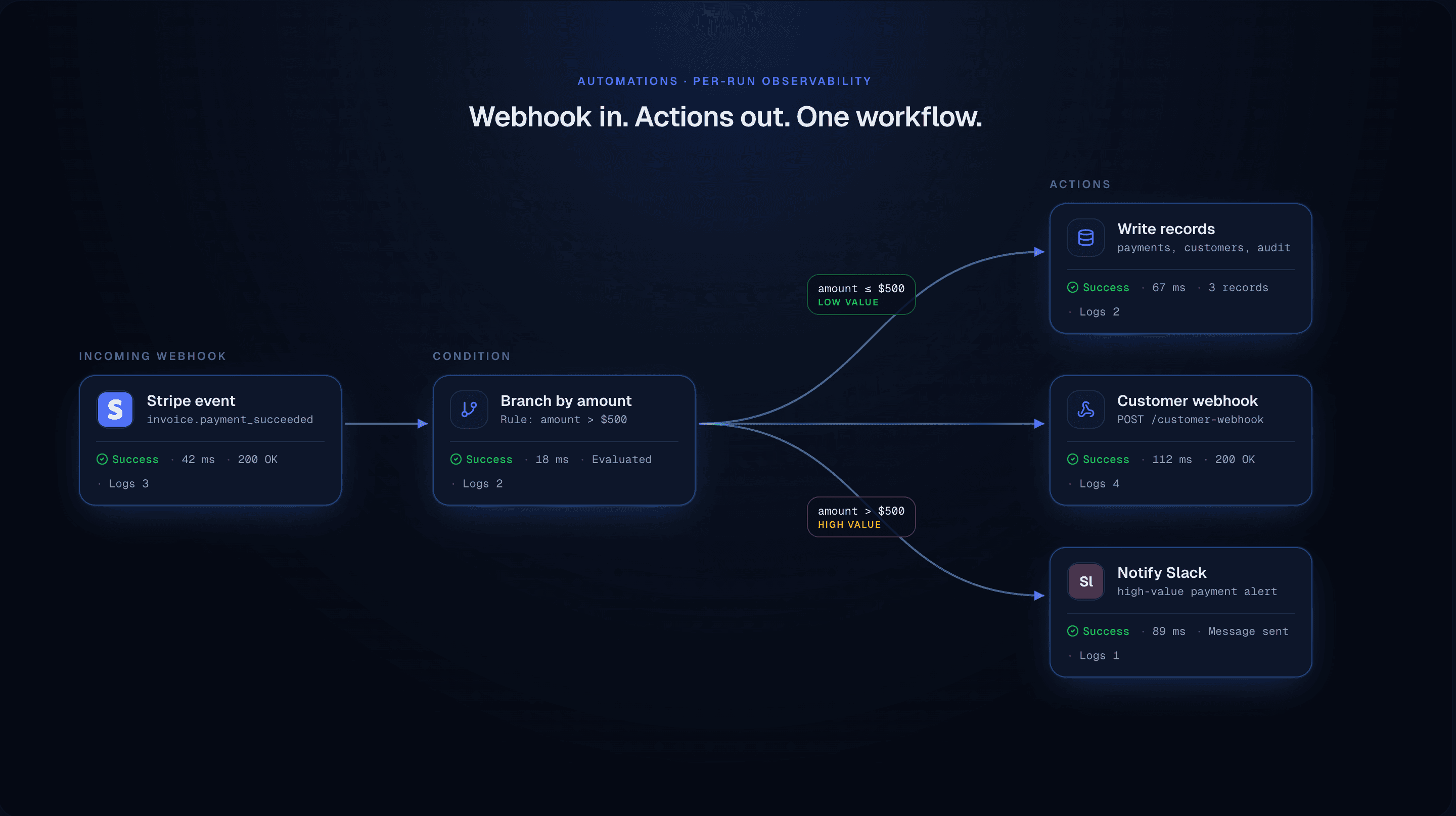
Chain your compute functions into multi-step workflows with conditional logic, scheduling, and automatic retries. Define via the console editor or the API.
Workflow Automation
Docs →Chain functions into multi-step workflows with visual editing. Define triggers, branching logic, and error handling in one place.
Decision Steps
Docs →Route workflows based on data conditions with 10+ comparison operators. Support for nested paths, multiple conditions per case, and default fallbacks.
Delay Steps
Docs →Pause workflows for specified durations—perfect for reminder emails, approval timeouts, or rate-limited API calls.
Flexible Triggers
Docs →Start workflows on data events (record created/updated/deleted), HTTP webhooks with signature validation, cron schedules, or on-demand via API.
Run Observability
Docs →Track every workflow execution with detailed step history, input/output inspection, activity logs, and execution traces for debugging.
Outgoing webhooks
Docs →Call external services when data changes or functions run—ideal for payments, CRMs, and external APIs.
Notifications
Docs →Use Centrali as the backbone for email or push notifications driven by your own events.
Real-time updates
Docs →Subscribe to record events via Server-Sent Events (SSE) and keep your UI in sync. Filter by collection, event type, or data values with automatic reconnection handled by the SDK.
Access Control
Protect your data with workspace isolation and fine-grained access rules that fit multi-tenant apps by default.
Workspace isolation
Each workspace has its own data, functions, billing, and configuration — like separate projects without separate accounts.
Roles & permissions
Grant least-privilege access and map roles to how your product is organized.
Limits & quotas
Docs →Understand rate limits and resource quotas clearly so you can design with confidence.
Developer Experience
A clean REST API, TypeScript SDK, and real examples so you can ship production code quickly.
REST API
Docs →Every capability is exposed via HTTPS APIs documented in the API reference.
JavaScript/TypeScript SDK
Docs →A first-class SDK that wraps authentication, records, queries, and function calls.
Examples & tutorials
Docs →Blog, e-commerce, and SaaS examples that show Centrali in real applications.