Every webhook provider deletes your events. Stripe drops them after 30 days. GitHub keeps deliveries for a few weeks. Shopify's are gone before you notice you needed them.
So you write the obvious handler: receive the POST, dump the body into a payload JSONB column, return 200. It works — right up until someone asks "how many failed charges did this customer have last quarter?" and you discover you have ten thousand rows of unqueryable JSON.
The fix is not a bigger database. It's storing events as records with the fields you'll filter on already flattened, keeping the raw payload alongside, and deduplicating on the provider's event ID.
New to the mechanics? What Is a Webhook? How They Work, With Examples covers delivery, retries, and signature verification before you wire one up here.
The two failures
Failure one: retention. The provider's dashboard is not your event history. Every provider treats delivery logs as an operational debugging aid with a short window, not as durable storage. The moment your business logic needs to answer a historical question, that window is the wrong length.
Failure two: the blob. payload JSONB feels like it preserves everything, and it does — it just doesn't let you ask anything. Filtering on a nested key across ten thousand rows means a sequential scan and a JSON path expression, or a migration to add generated columns, which is the schema work you were avoiding.
The shape that survives both looks like this:
| Field | Why it exists |
|---|---|
eventId | The provider's ID. Your deduplication key. |
eventType | What happened. The field you filter on most. |
receivedAt | When you got it — not when the provider says it happened. |
<flattened fields> | Customer, amount, status — whatever you'll actually query. |
raw | The complete original payload, untouched. |
Flatten what you query. Keep everything else in raw so you can backfill a new field later without having lost the data.
Step 1: Create the collection
In the Centrali console, create a collection called webhook-events in schemaless mode.
Schemaless matters here. A charge.succeeded payload looks nothing like a customer.subscription.deleted payload, and a GitHub push looks like neither. A rigid schema means every new event type is a migration.
One thing worth knowing up front: a schemaless collection accepts any shape, but the console's record list shows only ID and Created until you add the fields you care about to the schema. Queries work either way — this is a display concern, not a storage one — but once you know which fields you filter on, adding them turns the list into a real table. That's the difference between the two screenshots you'd get at step 1 and step 5.
Step 2: Write the handler
Go to Logic > Functions and create a function called store-webhook-event.
async function run() {const event = executionParams.payload;const record = await api.createRecord('webhook-events', {eventId: event.id,eventType: event.type,receivedAt: new Date().toISOString(),customerId: event.data?.object?.customer,amount: event.data?.object?.amount,status: event.data?.object?.status,raw: event,});return { success: true, recordId: record.id };}
executionParams.payload is the request body. api.createRecord writes the record and returns it with the new ID at record.id. The flattened fields at the top are the ones you'll filter on later; raw keeps the original intact.
Adjust the flattened fields to your provider. GitHub events carry repository.full_name and sender.login rather than a customer and an amount — the pattern is identical, the field names differ.
Step 3: Deduplicate on event ID
Providers guarantee at-least-once delivery, not exactly-once. A network blip on your side means the same event arrives twice, and if your handler charges a card or sends an email, twice is expensive.
Check before you write:
async function run() {const event = executionParams.payload;const existing = await api.queryRecords('webhook-events', {where: { 'data.eventId': { eq: event.id } },page: { limit: 1 },});if (existing.data.length > 0) {return { success: true, duplicate: true, recordId: existing.data[0].id };}const record = await api.createRecord('webhook-events', {eventId: event.id,eventType: event.type,receivedAt: new Date().toISOString(),raw: event,});return { success: true, recordId: record.id };}
Send the same event twice and the second delivery returns duplicate: true with the record ID of the first. No second row.
Returning 200 on a duplicate is deliberate. A non-2xx tells the provider to retry, which turns one duplicate into a retry storm.
This is also why storing the event and acting on it should be two steps. Store first, return 200 immediately, then let a separate trigger do the work. A handler that stores and processes in one pass will eventually time out on the processing half and lose the event it had already received.
Step 4: Wire the HTTP trigger and verify signatures
Create an HTTP trigger pointing at the function. Your endpoint is:
https://api.centrali.io/data/workspace/<your-workspace>/api/v1/http-trigger/webhook-events
Then turn on signature verification. If you create the trigger through the API or SDK, you don't configure header names and regexes — you name the provider:
{"path": "webhook-events","validateSignature": true,"provider": "github","signingSecret": "<the secret the provider gave you>"}
The preset wires every wire-format detail: header name, signed-value format, digest encoding, secret encoding. Built-in presets cover Stripe, GitHub, Shopify, Slack, and Svix — and Svix covers Clerk, Resend, Loops, OpenAI, and Brex, since they all deliver through it.
Creating the trigger in the console instead? The provider shortcut isn't exposed there yet, so you'll fill in the equivalent fields by hand — signature header name, HMAC algorithm, digest encoding, and an extraction regex. For GitHub that's x-hub-signature-256, sha256, hex, and sha256=(.+). Same verification either way; the preset just saves you looking them up.
The important part: signature verification is configuration, not code. By the time your function runs, the request is already verified. Send a forged signature and the endpoint returns 400 Invalid signature; omit the header entirely and it returns 400 Missing signature header. Neither ever reaches executionParams.payload.
There's an ordering wrinkle worth knowing: most providers won't issue a signing secret until you've registered a URL with them. So create the trigger with just the path first, register the URL, then set validateSignature and the secret once you have it.
For the provider-specific walkthroughs, see Store Stripe Webhook Events and Query Them Forever and Ingest Webhooks From Any Provider — GitHub as the Example.
Step 5: Query them
Here is what the events look like once they're stored — every field you flattened is a column you can filter and sort on, with the full payload still in raw:
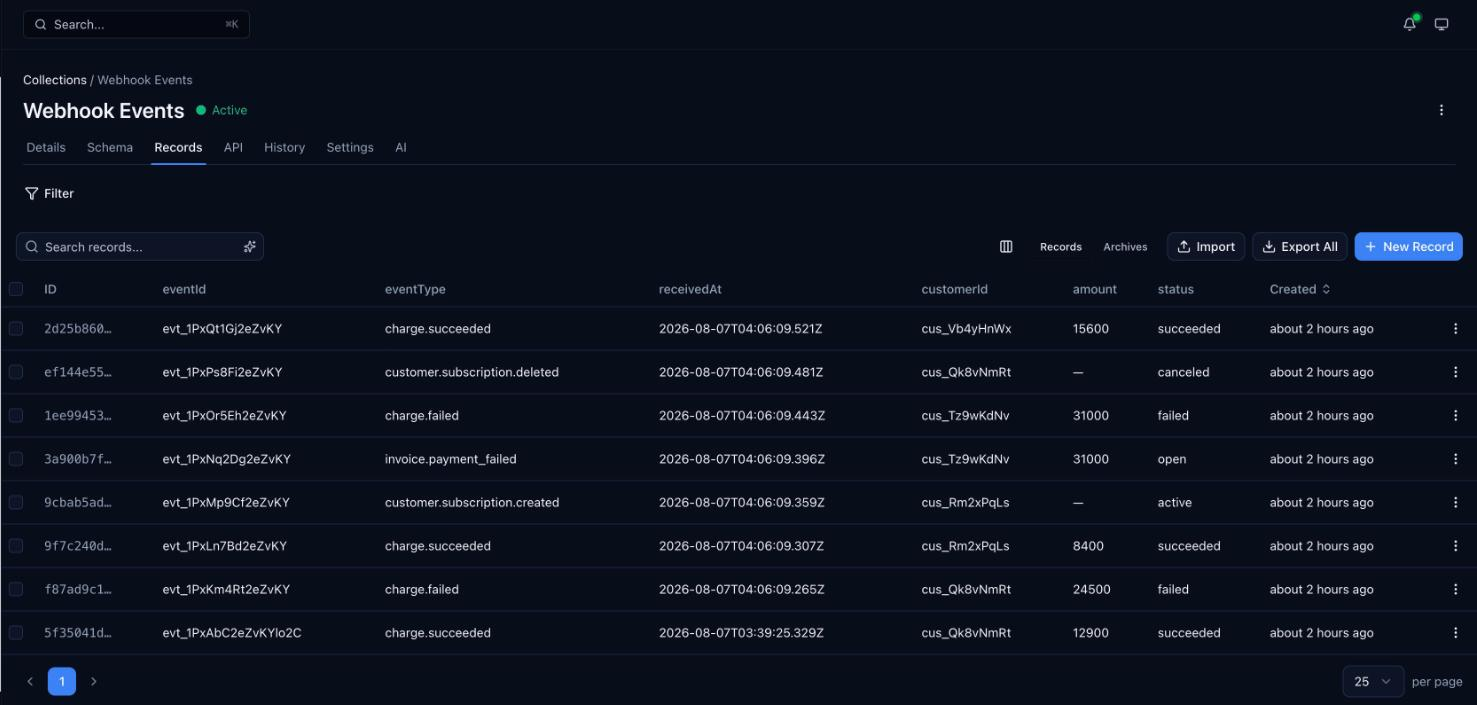
This is the part the JSON blob never gives you.
// Every failed charge over $100const bigFailures = await api.queryRecords('webhook-events', {where: {and: [{ 'data.eventType': { eq: 'charge.failed' } },{ 'data.amount': { gte: 10000 } },],},sort: [{ field: 'createdAt', direction: 'desc' }],});
// Everything that happened to one customerconst customerHistory = await api.queryRecords('webhook-events', {where: { 'data.customerId': { eq: 'cus_Qk8vNmRt' } },sort: [{ field: 'createdAt', direction: 'desc' }],page: { limit: 50 },});
// Several event types at once, with a total countconst subscriptionEvents = await api.queryRecords('webhook-events', {where: {'data.eventType': {in: ['customer.subscription.created', 'customer.subscription.deleted'],},},page: { limit: 100 },includeTotal: true,});
The field operators are eq, ne, gt, gte, lt, lte, in, nin, contains, startsWith, endsWith, hasAny, hasAll, exists, combined with and / or / not.
Note these filter on the flattened fields. That's the payoff for step 2 — data.amount with gte works because amount is a field, not a path into a blob.
What changes in production
A handler that stores events is an afternoon's work. What takes longer is everything around it:
- Signature verification — configured on the trigger, so unverified requests never reach your code.
- A durable buffer — signature-verified requests are buffered before your function runs, so a function that throws doesn't discard the event.
- Replay — when your handler had a bug, the stored payload can be replayed per event, exactly as it arrived.
- Run history — every execution recorded with its inputs, outputs, duration, and error.
- Deduplication — the at-least-once problem above, which is yours to handle regardless of platform.
- Querying — the whole reason you stored them.
Centrali gives you the ingestion, the buffer, the storage, and the query layer as one thing, so the "events table" stops being infrastructure you maintain and becomes a collection you query.
If you also need to send webhooks out to your own customers, Add Webhooks to Your SaaS in 10 Minutes covers the delivery side.
Try it: Receive and inspect your first webhook — a collection, a function, and a verified endpoint, in about five minutes.