TL;DR — If you're storing Stripe webhook events in Centrali, you can query them the same way you'd query a database — filter by amount, customer, event type, date range, or any field. Save those queries as Smart Queries with variables, or expose them as HTTP endpoints any external system can call.
Prerequisites: This builds on Store Stripe Webhook Events and Query Them Forever. If you've already got a stripe-events collection receiving events, you're ready. If not, that post takes about 5 minutes. New to webhooks themselves? What Is a Webhook? covers the fundamentals first.
The Problem With Stripe's Built-In Search
Stripe keeps webhook events for 30 days. The Events API lets you filter by type and date — that's it. You can't search by customer, amount range, currency, or metadata. And after 30 days, the events are gone.
If you followed the first post in this series, your stripe-events collection already has every event Stripe has ever sent you, with fields like eventType, customerId, amount, currency, and status flattened to the top level. Now let's actually use them.
Step 1: Filter in the Console
The fastest way to search is right in the Centrali console. Open your stripe-events collection and use the filter controls to narrow down records.
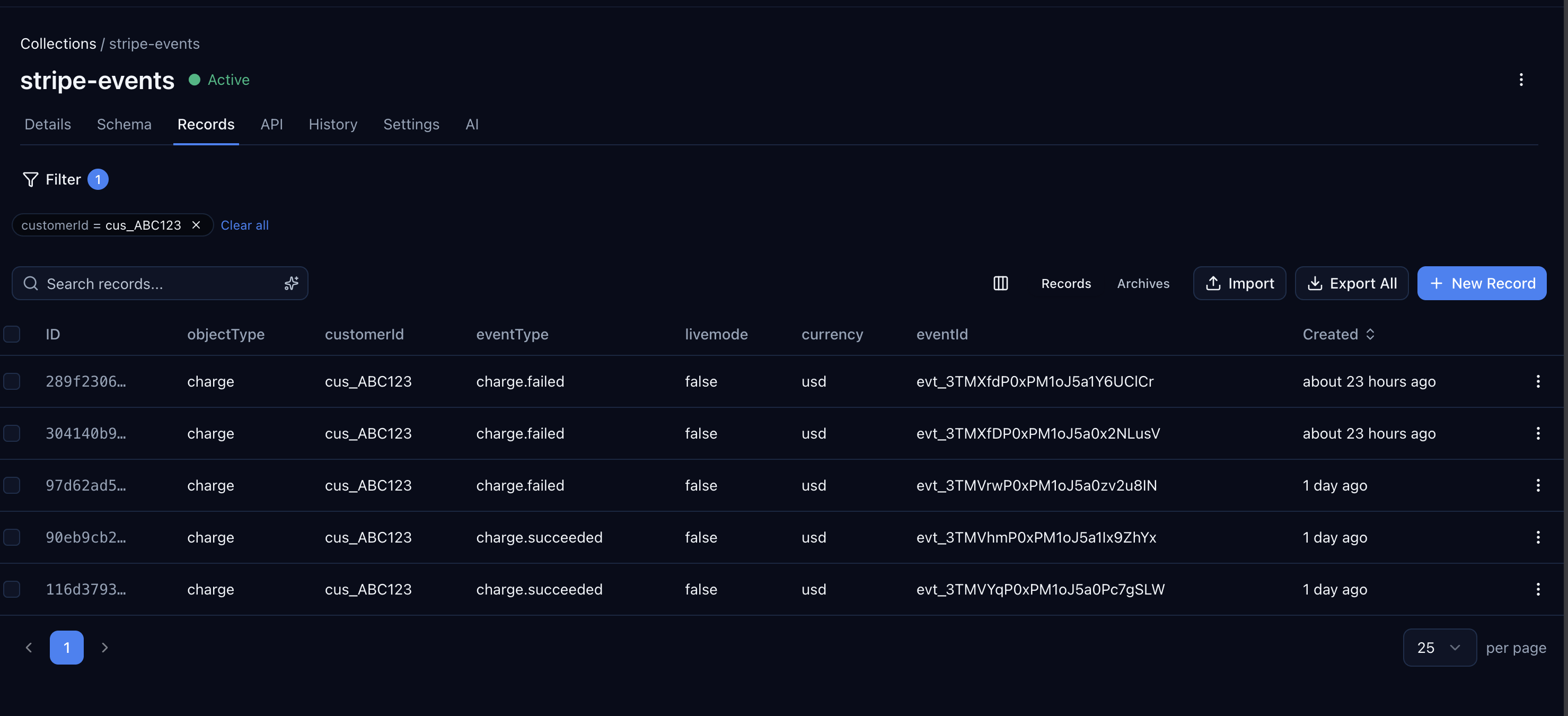
A few examples of what you can do without writing any code:
- Filter
eventTypeequalscharge.failedto see every failed charge - Filter
amountgreater than10000(amounts are in cents) to find large transactions - Filter
customerIdequalscus_ABC123to see everything for one customer - Combine filters to narrow further — failed charges over $100 for a specific customer
You can also use the search bar at the top of the collection to search across all fields with natural language — type "failed charges for cus_ABC123" and it finds matching records without setting up filters manually.
Step 2: Query With the SDK
For anything beyond manual lookups, use the SDK. The queryRecords method supports the same operators you'd expect from a database — equality, ranges, string matching, pagination, and sorting.
import { CentraliSDK } from '@centrali-io/centrali-sdk';const centrali = new CentraliSDK({workspaceId: 'your-workspace',clientId: process.env.CENTRALI_CLIENT_ID,clientSecret: process.env.CENTRALI_CLIENT_SECRET,});
Filter by Event Type and Amount
// All failed charges over $100const bigFailures = await centrali.queryRecords('stripe-events', {'data.eventType': 'charge.failed','data.amount[gte]': 10000,sort: '-createdAt',});
Filter by Customer
// Every event for a specific customer, newest firstconst customerHistory = await centrali.queryRecords('stripe-events', {'data.customerId': 'cus_ABC123',sort: '-createdAt',pageSize: 50,});
Filter by Date Range
// All events from the last 7 daysconst sevenDaysAgo = new Date(Date.now() - 7 * 24 * 60 * 60 * 1000).toISOString();const recentEvents = await centrali.queryRecords('stripe-events', {'createdAt[gte]': sevenDaysAgo,sort: '-createdAt',includeTotal: true,});console.log(`${recentEvents.meta.total} events in the last week`);
Combine Multiple Filters
// Failed charges over $50 in USD, newest firstconst results = await centrali.queryRecords('stripe-events', {'data.eventType': 'charge.failed','data.amount[gte]': 5000,'data.currency': 'usd',sort: '-createdAt',pageSize: 20,includeTotal: true,});
Search Across Fields
// Full-text search for a customer email or nameconst matches = await centrali.queryRecords('stripe-events', {searchFields: 'data.customerId,data.raw',});
Paginate Through Large Result Sets
// Page through all subscription eventslet page = 1;let hasMore = true;while (hasMore) {const batch = await centrali.queryRecords('stripe-events', {'data.eventType[in]': 'customer.subscription.created,customer.subscription.deleted',sort: '-createdAt',page,pageSize: 100,includeTotal: true,});for (const record of batch.data) {// process each event}hasMore = page * 100 < batch.meta.total;page++;}
Available Filter Operators
Every filter field supports these operators via bracket notation:
| Operator | Example | Description |
|---|---|---|
eq (default) | 'data.status': 'active' | Equals |
ne | 'data.status[ne]': 'draft' | Not equal |
gt / gte | 'data.amount[gte]': 10000 | Greater than / greater than or equal |
lt / lte | 'data.amount[lt]': 5000 | Less than / less than or equal |
in | 'data.eventType[in]': 'charge.failed,charge.refunded' | Value in list |
nin | 'data.status[nin]': 'draft,archived' | Value not in list |
contains | 'data.customerId[contains]': 'cus_A' | String contains (case-insensitive) |
startswith | 'data.eventType[startswith]': 'charge.' | Starts with (case-insensitive) |
Step 3: Save a Smart Query
The SDK queries from Step 2 are great when a developer is writing application code. But what about your support lead who needs to check a customer's charge history? Or a finance teammate who runs the same "failed charges this month" report every week?
Smart Queries let you save a query with a name, description, and variables — then anyone on the team can run it from the console without writing code. They're also callable by name from the SDK and via MCP, so your AI assistant can execute them too.
Create a Smart Query in the Console
Open your stripe-events collection in the Centrali console and go to Smart Queries. Click New Query and fill in the details:
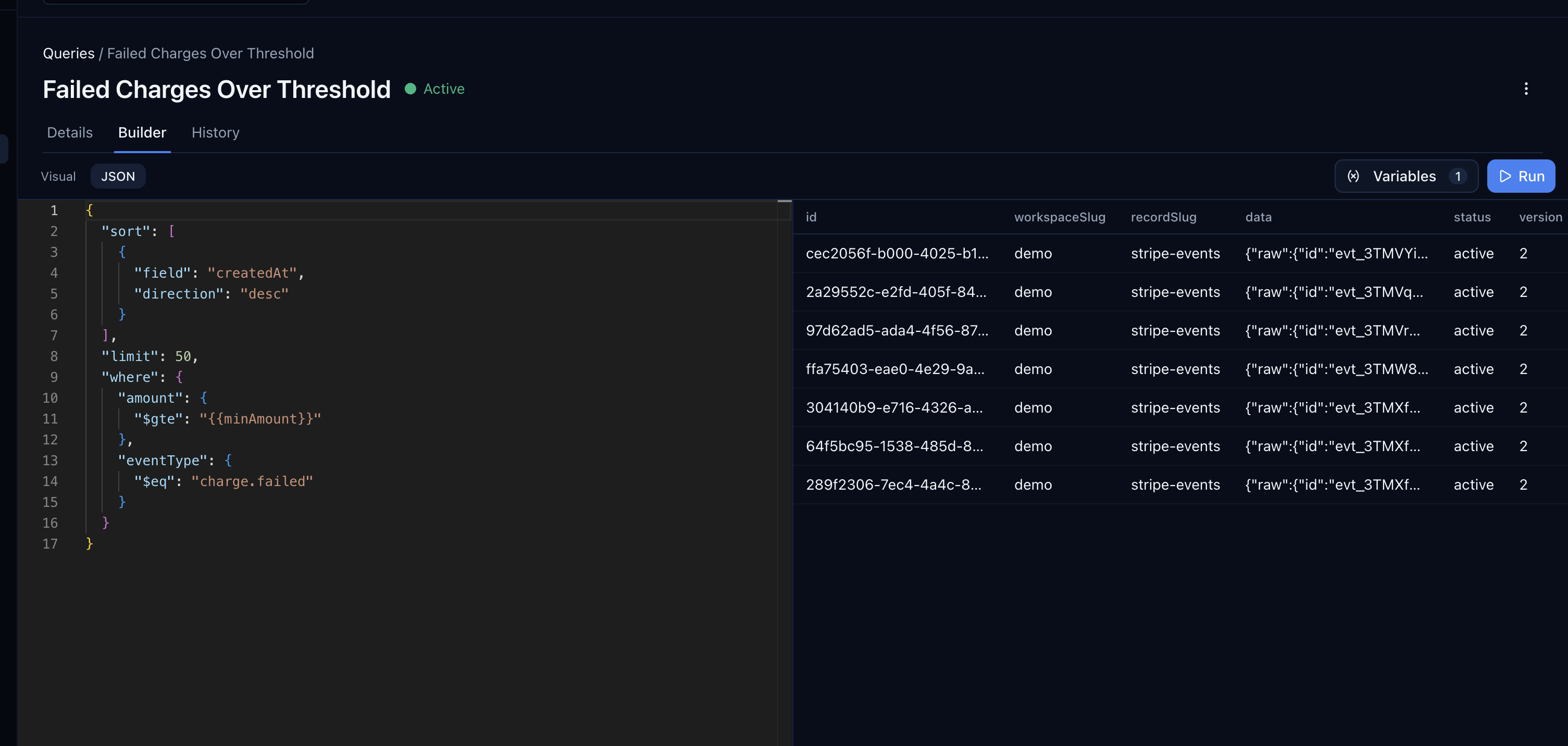
| Field | Value |
|---|---|
| Name | Failed Charges Over Threshold |
| Description | Failed charges above a configurable amount, newest first |
Set the query definition:
- Where:
eventTypeequalscharge.failedANDamountis greater than or equal to{{minAmount}} - Sort:
createdAtdescending - Limit:
50
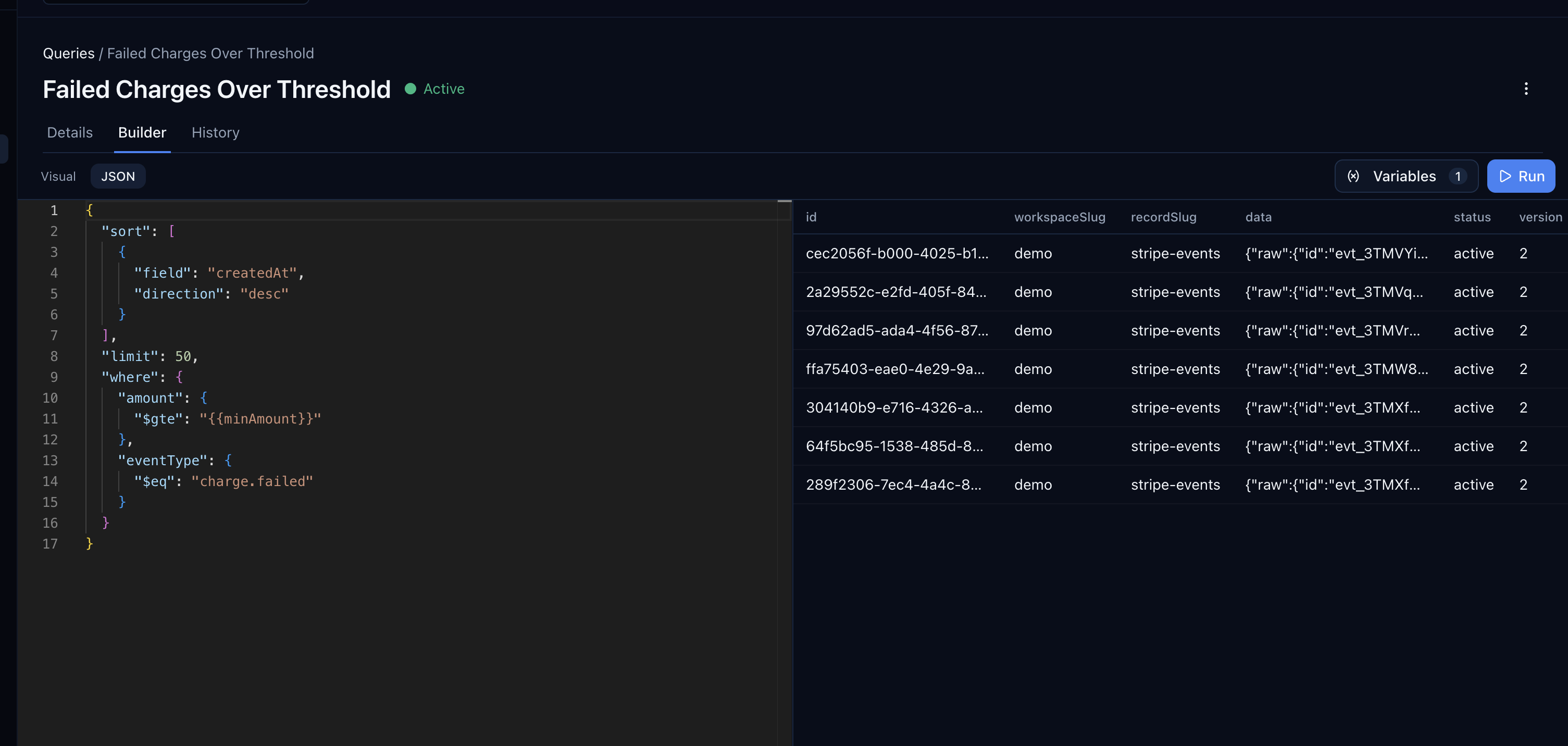
The {{minAmount}} placeholder is a variable. When someone runs this query, they just enter a dollar threshold — no filters to configure, no code to write. The same saved query works for "failed charges over $50" and "failed charges over $500."
Save it and run it from the console by entering a value for minAmount (remember, Stripe amounts are in cents — 10000 = $100).
A Few Useful Queries to Save
- Failed Charges Over Threshold — the one above. Your finance team runs it weekly.
- Customer Event History — where
customerIdequals{{customerId}}, sorted bycreatedAtdescending. Support pastes in a customer ID, gets the full timeline. - Events By Type and Date — where
eventTypeequals{{eventType}}ANDcreatedis greater than or equal to{{sinceTimestamp}}. Pass a Unix timestamp —1775136000for April 1, 2026. "Show me all failed charges since the start of the month."
Execute a Smart Query From Code
Saved queries are also callable from application code. Retrieve by name, execute with variables:
const query = await centrali.smartQueries.getByName('stripe-events','Failed Charges Over Threshold',);const results = await centrali.smartQueries.execute('stripe-events',query.data.id,{variables: { minAmount: 10000 },},);console.log(`${results.data.rowCount} failed charges over $100`);// results.data.rows → array of matching records
Step 4: Expose a Query as an API Endpoint
Smart Queries and SDK calls are great when you control the calling code. But what if a support dashboard, a Retool app, or a partner integration needs to search your Stripe events? You don't want to hand out SDK credentials for a read-only lookup.
Create a compute function that runs a query and attach an Endpoint trigger. The trigger gives you a URL that returns results synchronously — like a custom API endpoint, with no server to manage.
Write the Function
In the console, go to Logic > Functions and create a new function called search-stripe-events.
async function run() {const query = executionParams.query || {};const filters = {};if (query.customerId) {filters['data.customerId'] = query.customerId;}if (query.eventType) {filters['data.eventType'] = query.eventType;}if (query.minAmount) {filters['data.amount[gte]'] = parseInt(query.minAmount, 10);}if (query.maxAmount) {filters['data.amount[lte]'] = parseInt(query.maxAmount, 10);}if (query.since) {filters['createdAt[gte]'] = query.since;}const results = await api.queryRecords('stripe-events', {...filters,sort: '-createdAt',pageSize: parseInt(query.limit || '20', 10),page: parseInt(query.page || '1', 10),includeTotal: true,});return {events: results.data,total: results.meta.total,page: results.meta.page,pageSize: results.meta.pageSize,};}
Create the Endpoint Trigger
Go to Logic > Triggers and create a new trigger:
| Field | Value |
|---|---|
| Name | search-stripe-events |
| Function | search-stripe-events |
| Type | Endpoint |
| Path | search-stripe-events |
| Allowed Methods | GET |
| Auth Mode | API Key |
This generates an endpoint URL and an API key. Store the key — it won't be shown again.
Call It
# All failed charges over $100curl -s "https://api.centrali.io/data/workspace/YOUR_WORKSPACE/api/v1/endpoints/search-stripe-events?eventType=charge.failed&minAmount=10000" \-H "X-API-Key: YOUR_API_KEY" | jq
{"events": [{"id": "rec_abc123","data": {"eventId": "evt_1abc","eventType": "charge.failed","customerId": "cus_DEF456","amount": 15000,"currency": "usd","status": "failed","created": 1713100800}}],"total": 3,"page": 1,"pageSize": 20}
# Everything for one customer, page 2curl -s "https://api.centrali.io/data/workspace/YOUR_WORKSPACE/api/v1/endpoints/search-stripe-events?customerId=cus_ABC123&page=2&limit=10" \-H "X-API-Key: YOUR_API_KEY" | jq
# Events since a specific datecurl -s "https://api.centrali.io/data/workspace/YOUR_WORKSPACE/api/v1/endpoints/search-stripe-events?since=2026-01-01T00:00:00Z" \-H "X-API-Key: YOUR_API_KEY" | jq
Anyone with the API key can search your stored Stripe events over HTTP — no SDK, no database credentials, no server. Swap the auth mode to bearer if you want to use JWT tokens, or public if the endpoint should be open (not recommended for financial data).
Use Centrali MCP With Your AI Assistant
If you use Centrali's MCP server, your AI assistant can query the stripe-events collection directly. Ask it things like "show me all failed charges this month" or "find events for customer cus_ABC123" — it uses the same query operators under the hood.
What's Next
- Store Stripe Webhook Events and Query Them Forever — if you haven't set up the collection yet, start here
- Get Alerted When a Stripe Charge Fails — add real-time alerting on top of stored events
- Ingest Webhooks From Any Provider — GitHub as the Example — the same storage pattern works for GitHub, Shopify, Twilio, or any provider
- Your Webhook Data Is Schemaless — Here's How to Give It Structure — turn raw webhook JSON into typed, validated properties