TL;DR — If you're storing ecommerce orders (Shopify, WooCommerce, BigCommerce, or a custom checkout) and Stripe webhook events in the same Centrali workspace, you can join them in a single Smart Query on paymentIntentId. Every order paired with its charge event side by side — amount mismatches jump out immediately. No ETL, no data warehouse, no scripts.
Your orders live in one place. Your charges live in another. In a healthy system those two numbers match, but nobody ever checks — and when they don't match, you find out from a confused customer weeks later.
Reconciliation usually means an export, a join in a spreadsheet or BI tool, and a cron job nobody trusts. With your orders and your Stripe events in the same Centrali workspace, it's one Smart Query.
The Problem
You sell something. Stripe charges the card. Your storefront (Shopify, WooCommerce, BigCommerce, or whatever you built) records the order. Everything should line up:
- Every paid order should have a
charge.succeededevent in Stripe - The
totalPriceon the order should match theamounton the charge - Every refunded order should have a
charge.refundedevent
Most of the time it does. But not always:
- Amount mismatches — a discount code misfired, tax calculation drifted, or a partial auth was captured at a different amount
- Missed webhooks — your storefront went down for an hour and half a dozen
charge.succeededevents never updated your order records (detection for this class of mismatch is coming; see the note near the end of this post) - Orphan charges — a test charge in prod, a charge against a deleted order, or a buggy integration (same — coming)
The fix isn't rocket science. Pair each order with its charge, look for mismatches, act on what you find. The hard part is where you do the pairing. Spreadsheets go stale. BI tools have a lag. A nightly script is one more thing to babysit.
Centrali's Smart Queries join across collections live — the result is as fresh as the data.
Prerequisites
Two collections in your workspace:
- An orders collection — records from your storefront, one per order. Shopify-shaped is the most common; fields like
orderNumber,customerEmail,totalPrice,financialStatus, andpaymentIntentId. - A Stripe events collection — webhook events from Stripe, including
charge.succeeded. Must includepaymentIntentIdextracted to the top level so we can join on it.
The shared key is paymentIntentId. Every Stripe charge is tied to a PaymentIntent, and most ecommerce platforms store that id on the order. If yours doesn't, store it as metadata when you create the charge.
If you haven't set up the events collection yet, see Store Stripe Webhook Events and Query Them Forever. For the orders side, the Ingest Webhooks From Any Provider walkthrough covers the same pattern for Shopify or WooCommerce — point a webhook trigger at Centrali, extract paymentIntentId to the top level, done.
For this post we'll use two demo collections — orders-demo (12 orders) and stripe-charges-demo (12 charge.succeeded events) — with one intentional amount mismatch seeded in.
Step 1: The Two Sides
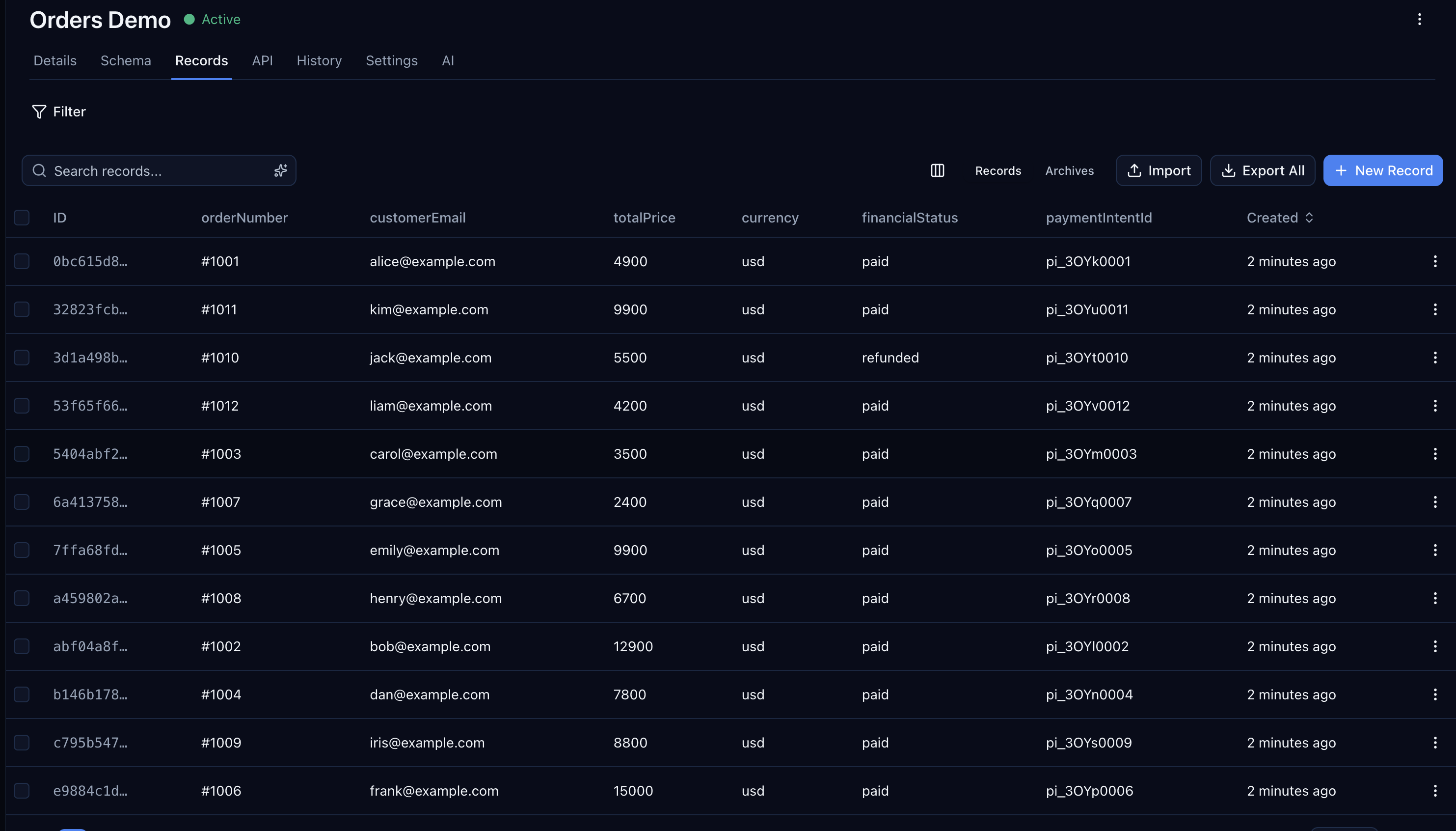
Open orders-demo in the console. You'll see the 12 orders from a mix of sources — Shopify, WooCommerce, BigCommerce, and one custom checkout:
And stripe-charges-demo holds the charge.succeeded events received from Stripe, each with a paymentIntentId and an amount:
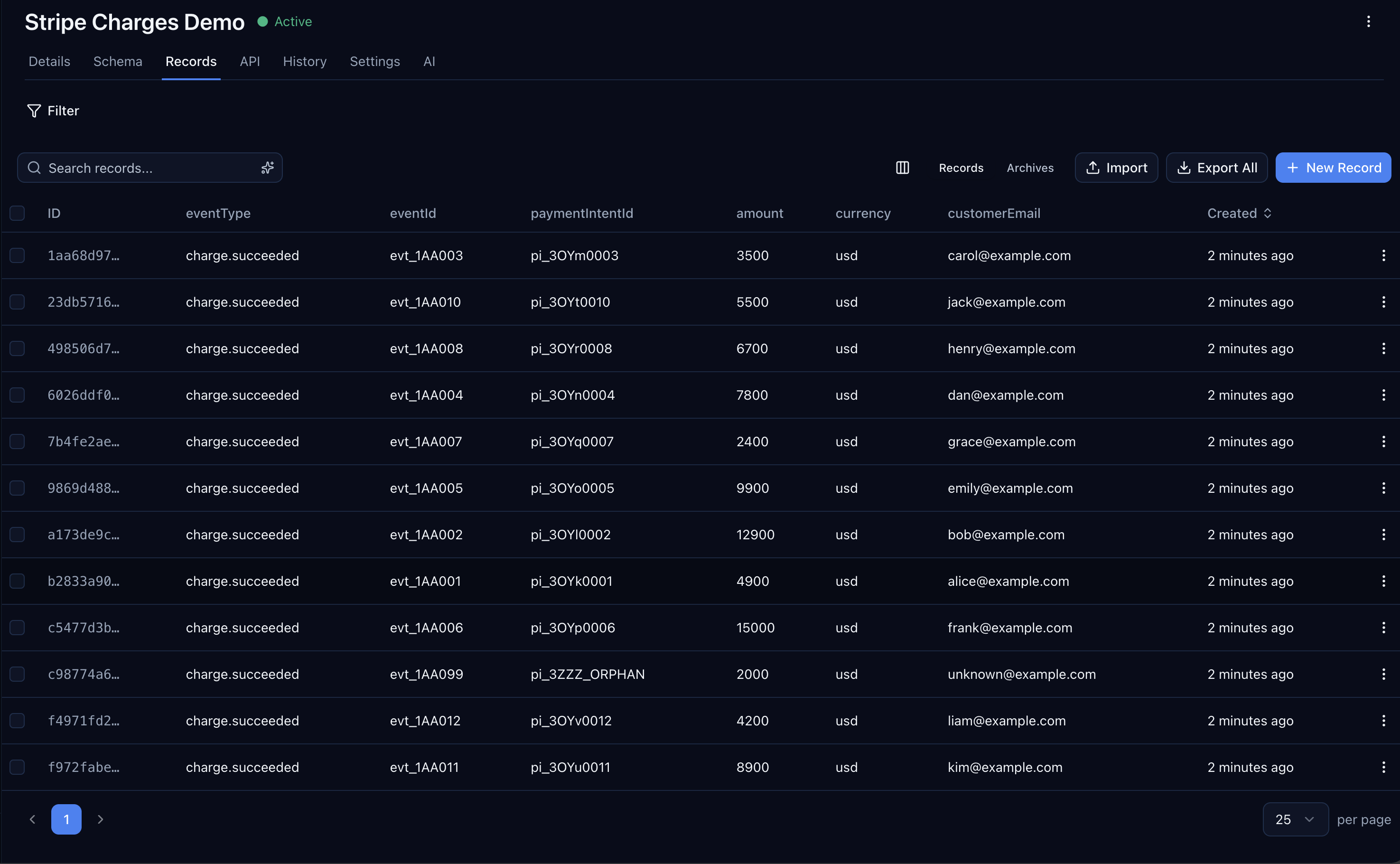
Pay attention to order #1011 and event evt_1AA011. The order's totalPrice is 9900 cents. The event's amount is 8900 cents. $10 off — not the kind of thing you'd notice by eye across hundreds of orders.
Step 2: Build the Smart Query
Open the Smart Query builder on orders-demo and configure a join to stripe-charges-demo on paymentIntentId:
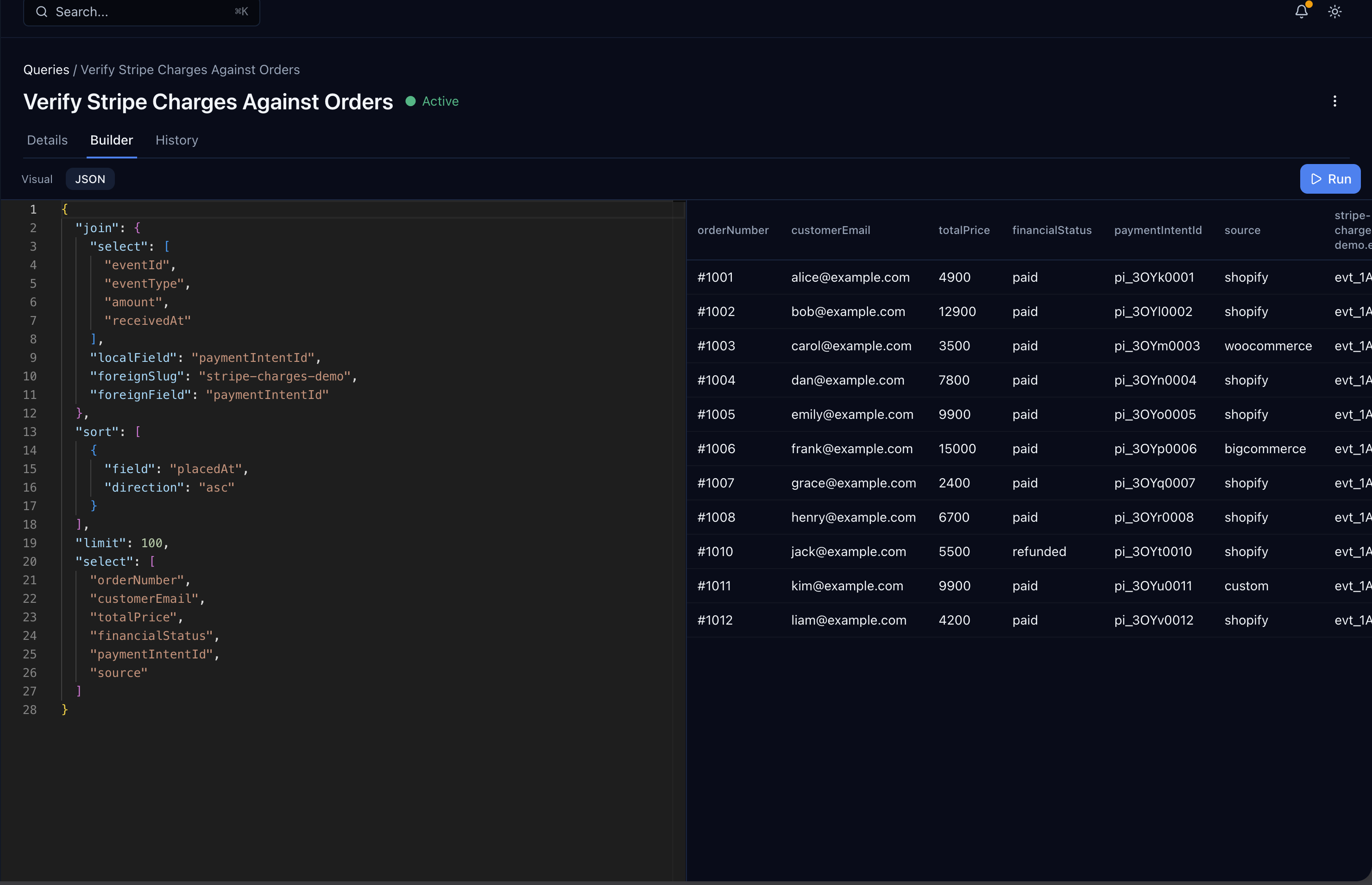
Or in JSON if you prefer the code view:
{"select": ["orderNumber", "customerEmail", "totalPrice", "financialStatus", "paymentIntentId", "source"],"join": {"foreignSlug": "stripe-charges-demo","localField": "paymentIntentId","foreignField": "paymentIntentId","select": ["eventId", "eventType", "amount", "receivedAt"]},"sort": [{ "field": "placedAt", "direction": "asc" }],"limit": 100}
What the join does, in plain SQL terms: orders.paymentIntentId = events.paymentIntentId. Each matched pair becomes one row with the order fields up top and the event fields nested under _joined["stripe-charges-demo"].
Save it as "Verify Stripe Charges Against Orders". Smart Queries are reusable — run it on demand, run it on a schedule, or expose it as an HTTP endpoint for your finance dashboard.
Step 3: Read the Result
Run the query. Eleven rows come back — one for each order that has a matching charge event. Scan the totalPrice column next to _joined.stripe-charges-demo.amount:
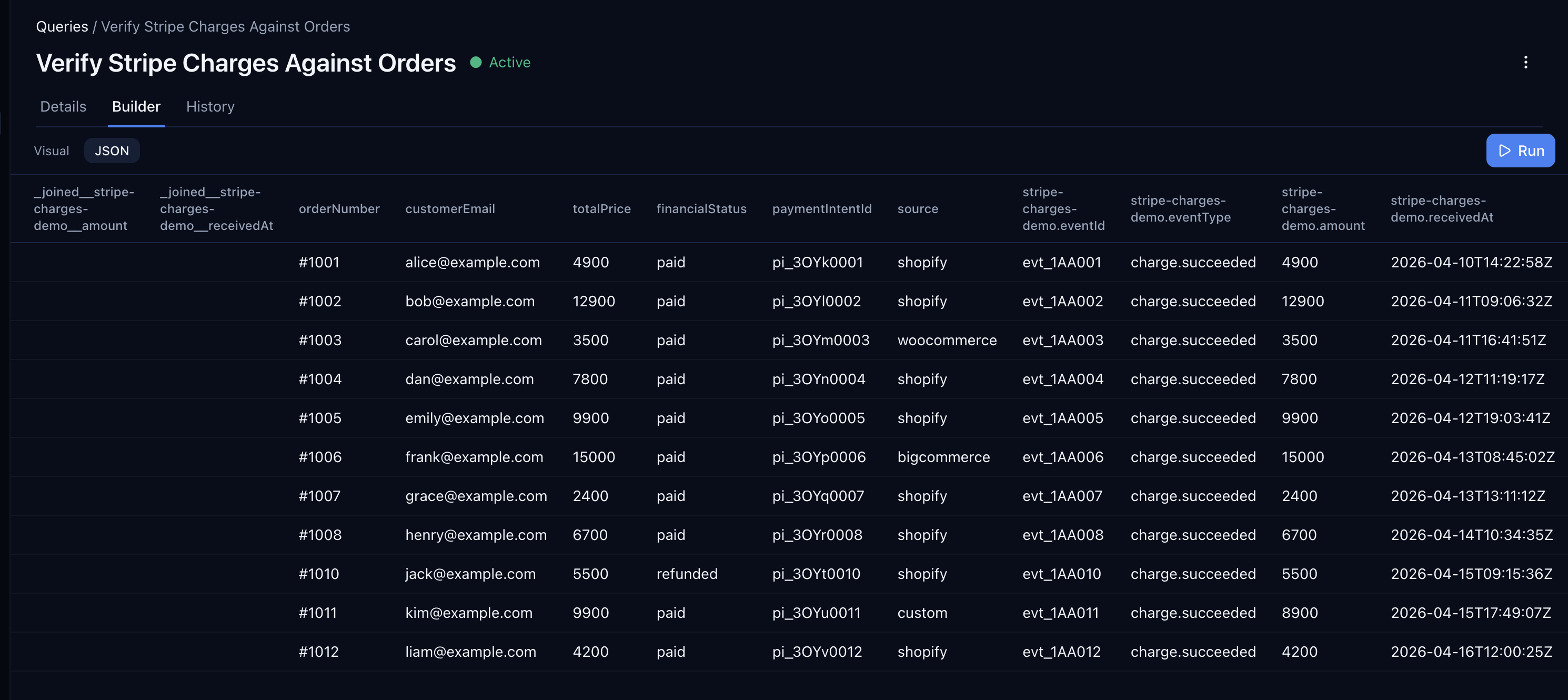
Ten rows match exactly. One doesn't: order #1011 ([email protected]) shows totalPrice: 9900 next to amount: 8900. That's your reconciliation finding. $10 difference. Now you can go look at the order, the Stripe charge, and figure out whether someone applied a discount code that never made it to the order record, a tax adjustment, or something worse.
The power isn't that Centrali finds the mismatch for you — you still read the output. The power is that the pairing is live, one query, no ETL. Run it tomorrow and you'll see tomorrow's mismatches too.
Surface Only the Mismatches
Reading 11 rows is fine. Reading 11,000 isn't. Add a filter to the query that compares the two amounts directly, so only mismatched rows come back:
{"select": ["orderNumber", "customerEmail", "totalPrice"],"join": {"foreignSlug": "stripe-charges-demo","localField": "paymentIntentId","foreignField": "paymentIntentId","select": ["eventId", "amount"]},"where": {"$expr": { "$ne": ["$totalPrice", "$_joined.stripe-charges-demo.amount"] }}}
Save that as its own Smart Query — "Orders With Charge Amount Mismatch". It's the one your finance team wants bookmarked.
Expose It as an Endpoint
Smart Queries double as HTTP endpoints. Flip the toggle on your reconciliation query and you get a GET URL your finance dashboard, Retool board, or cron script can hit:
curl -H "Authorization: Bearer $CENTRALI_KEY" \"https://api.centrali.io/queries/orders-with-charge-amount-mismatch/execute"
Now you can wire it to a daily Slack message, a Retool alert panel, or a scheduled function that emails the list. The query stays in Centrali; the delivery lives wherever you want it.
What This Catches Today — and What's Coming
This post covers the case where both sides exist and disagree. The other reconciliation classes — orders with no matching charge event (missed webhooks) and charge events with no matching order (orphan charges) — require an outer join, which Centrali's Smart Queries don't support yet. An RFE is in. When it lands we'll publish a follow-up that extends this same orders-demo + stripe-charges-demo pair to cover:
- Every paid order missing a
charge.succeededevent - Every
charge.succeededevent with no matching order - Every refunded order missing a
charge.refundedevent
Until then, if you need to catch missing events today, run a scheduled Centrali function that reads from both collections and diffs the paymentIntentId sets.
Setting Up Order Webhooks
This walkthrough assumed you've already got orders flowing into Centrali. If you haven't, your storefront almost certainly emits order webhooks:
- Shopify Admin API — Webhooks
- WooCommerce REST API — Webhooks
- BigCommerce — Webhooks
- Adobe Commerce (Magento) — Webhooks
- Custom checkout on Stripe? See Store Stripe Webhook Events and Query Them Forever — the same pattern applies.
The ingestion shape is identical across providers: point the webhook at a Centrali trigger, extract paymentIntentId and a few top-level fields, and records start landing.
What's Next
This is the final post in the Stripe webhook series. If you landed here first, the rest of the series walks through the pieces this post assumed:
- Store Stripe Webhook Events and Query Them Forever — the webhook handler and storage pattern
- Get Alerted When a Stripe Charge Fails — real-time alerting on top of stored events
- Ingest Webhooks From Any Provider — GitHub as the Example — the same pattern for Shopify, WooCommerce, or anything else
- Query Stripe Webhook Events Like a Database — Smart Queries and endpoints in depth
- Turn Schemaless JSON Into a Typed Schema — get typed columns on your webhook collection